
How to Use Claude Code: Complete Tutorial for Product Managers (2026)
Complete Claude Code tutorial for PMs with 5 real workflows and step-by-step examples. Covers installation, agents, MCP servers, and cost management.
The PM job keeps expanding. Writing requirements and waiting for sprints is no longer the whole of it. More of us are building the crude first prototype, digging through logs to trace a user-reported bug, or answering a pricing question by reading the competitor's checkout page. Claude Code is the tool I've reached for most often to do that kind of work without pretending to be an engineer.
This guide walks through installation, the workflows that save real time, and the sharp edges. It assumes terminal access and at least one project to point the CLI at. Everything below has been tested on PM-typical work: prototyping, competitive research, codebase exploration, and the occasional automation.
What is Anthropic Claude Code and Why Product Managers Need It
Anthropic Claude Code is a command-line agent. It runs locally, talks to Claude's API, and has direct access to your files, your git history, and the shell. A browser chatbot can only react to what you paste in. This one can read the whole repo, write to it, run the test suite, and coordinate with other tools through Model Context Protocol servers.
The reason that matters for PMs is the old loop: PRD, sprint planning, mockup review, then hope the implementation matches the spec. That loop can collapse into an afternoon of conversation and a clickable prototype by dinner. Not always, and not for every kind of feature. But often enough that scoping and estimating start to feel different once you've done it a few times.
You need a Claude Pro or Max subscription. Max buys you much more usage, which matters once your codebase is bigger than a handful of files.
How to Use Claude Code CLI: Installation for Windows, macOS, and Linux
Setup takes five minutes. You need Node.js and a terminal.
On Windows, open PowerShell as administrator:
irm https://claude.ai/install.ps1 | iex
On macOS or Linux, open Terminal:
curl -fsSL https://claude.ai/install.sh | sh
Type claude when the installer finishes. The CLI prompts you to log in with your Claude.ai account, then activates your subscription tier.
How to Use Claude Code in Terminal: Getting Started
Navigate to any project directory and run claude. The agent indexes your files and waits for your first prompt. The first time I ran it in an existing Rails monorepo it sat for about 90 seconds before responding. Index-building scales with the size of the tree, so don't be alarmed.
Once it's responsive, everything happens through the terminal. No IDE plugin, no embedded chat. That sounds like a limitation at first, but it's the reason the agent can execute bash commands, edit files across the whole repo, and talk to external systems through MCP without going through extension APIs.
Understanding Agentic Autonomy vs Traditional AI Autocomplete
Autocomplete predicts the next character or line. An agent takes a goal and figures out which files to touch, which commands to run, and how to confirm the work.
Those are different modes of help. Autocomplete makes your typing faster. An agent shifts your role from writer to director: you describe the outcome, review the approach, and check the result. That's a real productivity gain on some tasks and a real liability on others. Without guardrails the agent will happily refactor whole modules, update dependencies, and rewrite configuration in ways that clash with your team's conventions.
The Baby Steps Framework: Breaking Down Complex Features
The most common failure mode is the spec dump. You paste an entire feature spec into the prompt and hope something functional comes out. What comes out is thousands of lines of untested code with incorrect assumptions baked in at every level.
A better pattern is smaller pieces with checkpoints. Start with the minimum version of the core behavior. Run it, confirm it works, add the next slice. Each checkpoint is a verification point. If the second slice breaks, you only have that slice to debug, not the whole thing. I usually aim for three to five named tasks per feature, in rough order of dependency, each small enough to review in a minute or two.
A prompt I lean on: "Propose a step-by-step approach for implementing this feature. Don't write code yet." Read the plan back critically, push on anything that looks off, then execute one step at a time. This breaks down once the codebase is larger than a few hundred files, at least in my testing, because the agent's plan starts over-indexing on surface patterns rather than the actual architecture. For that case, Plan Mode is the answer.
Real PM Workflows With Claude Code
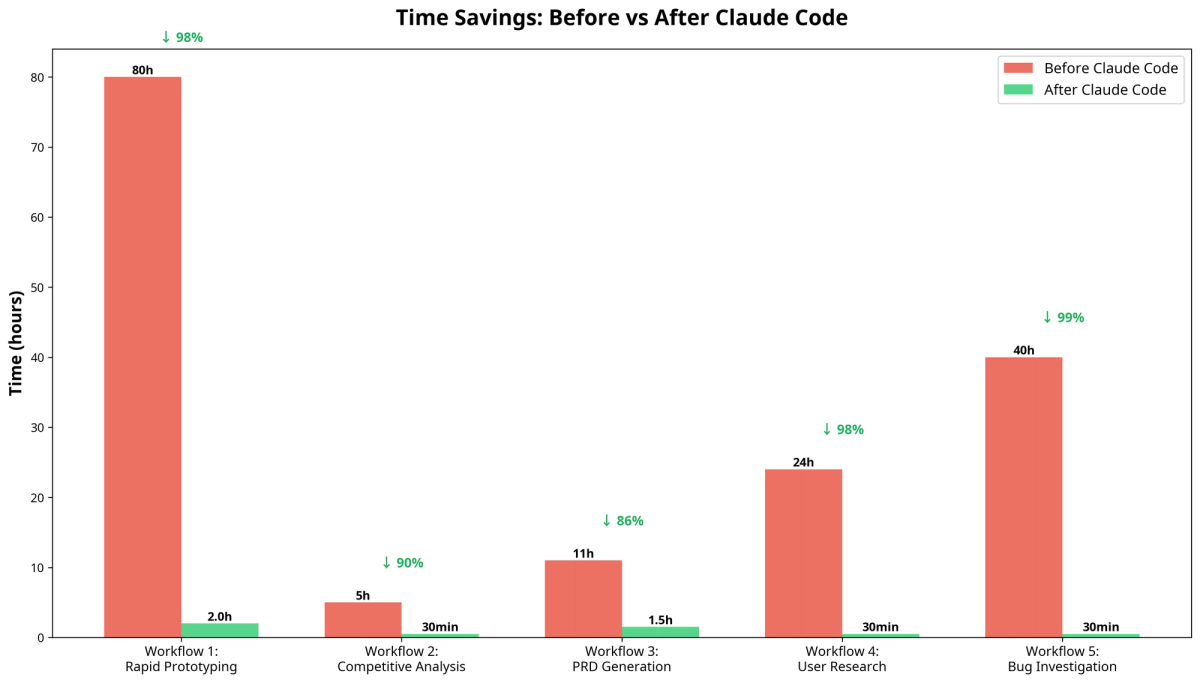
Two workflows have saved me the most time, and they're representative of where the agent helps most. The same pattern extends to bug triage, release-note drafting, and weekly competitor monitoring once you have the muscle memory.
Rapid feature prototyping
Say you want to test a "Summarize" button that turns a textarea into a one-paragraph summary. You want a clickable prototype before paying engineering time to build it for real.
The traditional cycle
Without an agent, the prototype goes through several teams and usually a full sprint.
Write PRD, wait for sprint planning, review mockups, hope the implementation matches requirements. Claude Code compresses this timeline by letting PMs build prototypes that actually run.
| Step | Description | Time Estimate |
|---|---|---|
| 1. Write Specification | The PM writes a detailed Product Requirements Document (PRD) outlining the feature, user stories, and acceptance criteria. | 4-6 hours |
| 2. Design Mockups | A UX/UI designer creates high-fidelity mockups of the button and the summary display. | 8-12 hours |
| 3. Sprint Planning | The feature is prioritized and added to the engineering backlog for an upcoming sprint. | 1-2 weeks (waiting) |
| 4. Development | An engineer builds the front-end components and integrates a basic summarization library. | 16-24 hours |
| 5. Review & Iterate | The PM reviews the prototype and provides feedback, potentially requiring another development cycle. | 4-8 hours |
Total Time to Prototype: 1-3 weeks
That's slow for a throwaway artifact, and the feedback loop on the idea suffers.
Prototyping with the CLI
With Claude Code, idea to demo is a fraction of that.
Objective: a plain HTML page with a textarea, a "Summarize" button, and a display area. The summarization itself is a placeholder for the prototype.
Create a new directory and drop into it.
1mkdir summarize-prototype
2cd summarize-prototype
3
Start the CLI and ask for the HTML and CSS scaffold.
1Create a simple HTML page with a large textarea for user input, a button labeled "Summarize", and an empty div below it to display the summary. Style it cleanly with CSS. The textarea should be the main focus of the page.Then wire up the button to a placeholder summarization function.
1Now, create a script.js file. When the "Summarize" button is clicked, it should take the text from the textarea, and after a 1-second delay (to simulate processing), display a placeholder summary text like "This is a summary of the text." in the summary display area.Time and cost
| Metric | Before Claude Code | After Claude Code |
|---|---|---|
| Time to Prototype | 1-3 weeks | ~ 30 minutes |
| PM Time | 8-12 Hours | 30 Minutes |
| Designer Time | 8-12 Hours | 0 Hours |
| Engineer Time | 16-24 Hours | 0 Hours |
| Total Cost (Est.) | $5,000 - $15,000 | <$5 (API credits) |
Result: a working interactive prototype the same day, at a fraction of the labor cost. Fast enough to put it in front of users that afternoon.
Competitive analysis automation
You need pricing and packaging from three competitors before a strategy meeting. Not a thesis, just the facts.
The manual version
Open each pricing page, copy plans and prices into a spreadsheet, normalize column names, hunt for the tier asterisks.
| Step | Description | Time Estimate |
|---|---|---|
| 1. Visit Websites | The PM manually navigates to each competitor's pricing page. | 15 minutes |
| 2. Extract Data | The PM reads through each page, copying and pasting key information (plan names, prices, features) into a spreadsheet. | 2-3 hours |
| 3. Format & Synthesize | The PM cleans up the data, standardizes the format, and writes a summary of the findings. | 1-2 hours |
Total Time: 3-5 hours
Slow and error-prone, with most mistakes creeping in at the normalization step.
Automated with the CLI
Automate the whole thing for a structured markdown table in minutes.
Objective: scrape pricing pages of three competitors, generate a markdown comparison table.
Create a new directory and a file with the URLs.
1mkdir competitive-analysis
2cd competitive-analysis
3touch competitors.txt
competitors.txt:
1https://www.competitorA.com/pricing
2https://www.competitorB.com/pricing
3https://www.competitorC.com/pricing
Reference the file in your prompt and specify the output format.
1Read the list of URLs from competitors.txt. For each URL, scrape the pricing page to identify the different pricing plans, their costs, and key features. Then, create a markdown table that compares these plans side-by-side. The table should have columns for "Competitor", "Plan Name", "Price", and "Key Features".Time and cost
| Metric | Before Claude Code | After Claude Code |
|---|---|---|
| Time to Analysis | 3-5 hours | 15 minutes |
| PM Time | 3-5 hours | 15 minutes |
| Accuracy | Prone to manual error | High (automated) |
| Total Cost (Est.) | $150 - $250 (PM time) | <$1 (API credits) |
Result: research time drops by an order of magnitude, with output more consistent than the hand-copied version because the agent emits the same columns every time.
How to Use Claude Code Plan Mode for Safe Code Exploration
Both of those workflows assume you're running the agent in execute mode. When the codebase is unfamiliar, you want the safer mode first.
Plan Mode lets the CLI analyze your codebase and propose changes without touching anything. Read-only by design. You enter it by pressing Shift+Tab twice, or you launch the CLI with claude --permission-mode plan.
In Plan Mode the agent can read files, search for patterns, analyze dependencies, and produce a detailed modification plan. It cannot execute the plan until you leave the mode.
It is especially useful when you inherit code you didn't write, or when you're trying to trace a bug report through unfamiliar territory. Ask the agent to explain the auth flow, walk through a data transformation, or look for race conditions. You get the investigation without any risk of accidental edits. Once the proposal looks right, exit and execute the changes you approved. That split, analyze first and act second, is what makes Plan Mode safe to run against production.
Context Management: Avoiding the $40 Session Cost Trap
Claude Code keeps conversation history to maintain project context. Long sessions accumulate that history, which eats tokens and degrades the agent's output.
The failure mode has a name: context poisoning. Earlier failed attempts stay in the window, and the agent keeps referencing those dead ends. Suggestions land in the wrong directories. The agent over-engineers a trivial change because an unrelated thread two hours ago involved a complicated refactor.
Three commands manage the context:
/costshows current session spending and token usage/compactsummarizes conversation history while preserving the key decisions/clearresets the conversation for a fresh start
If the agent starts making illogical suggestions, that's the signal. Run /compact to condense the history, or /clear for a clean slate. Sessions on track for $40 often drop back to the dollar-or-two range right after a compact, and output quality recovers at the same time. Keep /cost in your peripheral vision on long sessions. Don't fight through a degrading context.
Creating Your CLAUDE.md Project Memory System
The CLAUDE.md file is persistent project memory. It sits in the project root, survives session resets, and is the main lever for encoding the conventions the agent should follow every time.
Run claude init to create a template, then fill it in with the things a new engineer would want on day one:
- Stack: Next.js with TypeScript, Vitest for testing, ESLint configuration
- Naming: functional components, named exports, kebab-case file names
- Architecture: state management through Context API, API routes in /pages/api, custom hooks in /hooks
- Testing: unit tests for utilities, integration tests for API routes, mock external dependencies
- Linting: no unused variables, consistent import order, strict TypeScript
The agent reads CLAUDE.md before making decisions. If your team always ships functional components and it drafts a class component, it self-corrects the next time because the rule is documented.
For monorepos, you can layer CLAUDE.md files in subdirectories. The agent merges them with the root file, so package-level quirks live alongside package-level code.
Update the file as the project evolves. Every time you catch the agent making a predictable mistake, add a line that would have prevented it. That is the closest thing the CLI has to long-term learning, and it is almost entirely in your hands.
How to Use Claude Code Agents for Specialized Tasks
The /agents command spawns specialized subagents in isolated context windows. That keeps the main session focused and stops one task's history from polluting another.
Each subagent owns a domain. A security-reviewer audits code for vulnerabilities, checks auth flows, and validates input handling. A test-runner executes the suite, reads failures, and proposes fixes. A documentation-writer generates JSDoc, README sections, and API docs. A performance-analyzer looks for bottlenecks and bundle-size issues.
Subagents keep separate conversation histories from the main session. You can spawn a test-runner to investigate a failing suite while the primary session keeps building a feature, and the test-runner's back-and-forth never consumes the main context window. It is structurally similar to how an effective engineering team works: specialists collaborate, you orchestrate.
How to Use MCP Servers with Claude Code: Complete Integration Guide
Model Context Protocol servers let the CLI talk to external systems beyond local files. GitHub, Jira, Figma, a database, Slack: each one becomes an ambient capability once installed. Add them with claude mcp add <name>.
Figma
The Figma MCP is the cleanest example of a design-to-code bridge. The agent pulls design tokens directly from a Figma file, generates CSS variables that match the system values, updates component styles when the Figma side changes, and verifies that an implementation matches the spec.
Product teams use it to close the gap between mockups and code. When a designer updates a component, the agent can propagate that change to the corresponding React component on the next prompt.
Other integrations worth having
GitHub creates pull requests and runs Actions workflows. Jira updates ticket status and adds comments. A database MCP queries data, analyzes schema, and generates migrations. Slack handles notifications and message fetching.
One caveat from my own setup: only add MCPs you actually need for the current workflow. Every active MCP fills the context window with its tool metadata, which eats budget and makes sessions more fragile. Treat them as dials, not always-on services.
How to Use Claude Code in VS Code and Other IDEs
Claude Code is a standalone CLI, not a VS Code extension. This trips people up, because there is a separate Anthropic product, the Claude AI VS Code extension, that provides inline chat and suggestions inside the editor. Different tool.
Open the integrated terminal in VS Code (or IntelliJ, Xcode, anything else) and run claude. Most people end up with a split: the editor on one side for typing, the Claude Code terminal on the other for autonomous multi-file work. The CLI does not replace the IDE; it adds a terminal-native agent on top.
How to Use Claude Code with Cursor: The Hybrid Workflow
Cursor and Claude Code solve different problems. Cursor is great at real-time autocomplete while you are actively typing code. Claude Code is great at autonomous multi-file refactors and analysis you don't want to babysit.
Cursor wins as the daily editor for writing features with inline suggestions, real-time error detection, and quick single-file refactors. The CLI wins as a sidecar for multi-file architectural changes, automated PR creation, deep codebase analysis, and any task you want to run while you focus on something else.
Most product teams arrive at this split after trying to do everything with one tool. Cursor accelerates routine coding. The CLI mops up the tedious work, like adding JSDoc to undocumented modules or rewriting import paths after a folder reorganization. Using both, the division of labor becomes obvious within a week.
How to Use Opus in Claude Code for Advanced Tasks
Opus is Anthropic's most capable model. The CLI defaults to Sonnet, which is cheaper and fast enough for most day-to-day work. For the hard problems, switch with /model opus.
Where Opus earns its cost
It is worth the extra credits for complex architectural analysis, security audits where vulnerabilities span many modules, legacy modernization on codebases big enough to stress the context window, and race conditions that need deeper reasoning.
Deploy it tactically. Use it on the task where the extra capability pays for itself, then switch back with /model sonnet for routine edits.
Common Pitfalls and How to Avoid Them
A few failure modes come up often enough to name.
The "boss robot" trap: the agent sometimes tells you to run a command instead of running it itself. If it says "now run npm test to verify," push back: "Please execute that directly." The behavior usually shifts for the rest of the session.
Permission fatigue: approving every suggested action is a real security risk. The agent may ask for access to environment files, which likely contain API keys. Deny sensitive files by default and allowlist only the routine commands you are comfortable running unattended.
Memory loss: Claude forgets earlier decisions inside the same session more often than you'd hope. Run /retrospective to make the agent write lessons back into CLAUDE.md. That gets the decision into persistent memory, which survives a /clear.
Over-engineering: given a vague brief, the agent tends toward more abstraction than necessary. Be explicit. "Implement this with a simple function, not a class hierarchy" or "Use existing utilities, don't create new abstractions" both work.
Ignoring test failures: the agent will occasionally keep adding features while the test suite is red. A standing rule works well: "Don't proceed with new work while any tests are failing. Fix or skip them first."
The 30-Minute Architecture Alignment Protocol
New projects benefit from a short upfront session that gets you and the agent on the same page before real work starts.
Minutes 0-10: open the project root and run claude "give me a high-level overview of this architecture". The agent walks through the file structure, dependencies, and visible patterns. Read the output critically. Where it is wrong, you have found a gap to close in project memory.
Minutes 10-20: update CLAUDE.md with the conventions your team usually assumes without writing down. Always use functional components. Prefer composition over inheritance. Keep components under 200 lines. Colocate tests with implementation. Use absolute imports for shared utilities.
Minutes 20-30: pick one tedious task that exercises what you just documented. Add TypeScript types to an untyped module. Write tests for a utility function. Document an API endpoint. You end the half hour with real work delivered and a much better-calibrated agent.
Token Economics and Cost Management
Claude Code usage tracks project size, conversation length, and file operations. Knowing roughly where the money goes prevents surprise bills.
The context window is the central knob. Claude Pro ships with a standard window suitable for most projects. Claude Max adds a 1-million-token window for massive monorepos, which you activate with /model sonnet[1m].
Costs come from four places: initial file indexing when a session starts, reading files during analysis, the running conversation history in each message, and the generated code in responses.
To keep them low:
- Open the CLI in the specific subdirectory you are working in, not the root of a huge monorepo
- Run
/compactevery 30-40 messages to summarize conversation history - Be explicit about which files you want touched, instead of letting the agent search the whole tree
- Continue previous sessions rather than starting new ones where the context would overlap
Monitor spending with /cost on long sessions. If costs spike unexpectedly, check whether the CLI was opened inside a directory with a massive node_modules or build-artifact tree. That one misstep explains the majority of surprise bills I have seen.
Frequently Asked Questions (FAQ)
Common questions about Claude Code, especially from product managers and other non-engineers.
How is Claude Code different from ChatGPT or other AI assistants?
ChatGPT and similar browser-based assistants are built for general-purpose conversation. Claude Code is a specialized agent that runs in your local terminal. It has direct access to your file system, which means it can read and write code, run tests, execute shell commands, and interact with your project the way another developer would. It is an autonomous partner rather than a reactive chatbot, and the difference shows up the moment you ask it to do anything that requires touching more than one file.
Do I need to be a developer to use Claude Code?
No. You can get real value out of the CLI without writing any code yourself. The workflows in this article assume a PM who can read a terminal prompt but not much more. The main skill is giving clear, high-level instructions and letting the agent handle the implementation details. If you can explain the outcome you want, you can usually get the CLI to produce it.
Is it safe to use Claude Code on a production codebase?
The CLI includes safeguards. The most important one is Plan Mode, which you launch with claude --permission-mode plan. In that mode the agent runs read-only: it analyzes the codebase and proposes a plan, but makes no modifications until you explicitly exit plan mode. Combined with deny-by-default permissions on sensitive files and a well-maintained CLAUDE.md, that setup is enough for cautious production work.
What is a CLAUDE.md file and do I need one?
A CLAUDE.md file is a configuration file you drop into your project's root directory. It gives the agent persistent, project-specific instructions that survive session resets. You use it to document the tech stack, coding conventions, key architectural patterns, and anything else the agent would otherwise have to rediscover every session. It is optional, but any non-trivial project will benefit from having one within a day of starting.
Can Claude Code work with images or designs?
Yes. The CLI accepts multimodal input, so you can paste in images such as design mockups or screenshots and ask the agent to turn them into code. A common PM use case: hand it a screenshot of a new UI component and ask for the corresponding HTML and CSS scaffold. The output isn't perfect. It is faster than describing the layout in words.
What are the main limitations of Claude Code?
It is not magic. It works best when you break big tasks into smaller steps and verify each one, which is the baby-steps framework covered above. It occasionally gets stuck or misunderstands a prompt, and you will need to correct it. Context poisoning degrades long sessions. The quality of the output tracks the quality of the CLAUDE.md and the specificity of the prompt. Think of it as augmenting your strategic thinking, not replacing your judgment about what to build.
How much does it cost to use Claude Code?
Usage is based on tokens processed, both input and output. Costs vary with task complexity and the size of your codebase. For the PM workflows covered in this article, a single task typically runs a few dollars or less. Large-scale code generation and analysis against a big monorepo can run higher, so it is worth keeping /cost in your peripheral vision on any session that stretches past an hour.
Conclusion: Mastering How to Use Claude Code
The CLI turns a PM from a consumer of engineering output into someone who can direct an autonomous development partner. That shift takes new skills: writing a useful CLAUDE.md, splitting features into verifiable steps, watching token economics, and delegating specialized work to subagents.
The payoff is real but uneven. On prototyping, competitive research, and one-off automations, the productivity difference is enormous. On large refactors of legacy codebases, the agent still needs more hand-holding than the marketing suggests, and it will occasionally waste an hour going down the wrong path. I have learned to pick my spots, and I still miss sometimes.
If you are starting today, the simplest useful path is the 30-minute architecture alignment above. Run it on whatever project you know best, write a CLAUDE.md that reflects how your team actually works, then try one of the baby-steps workflows on a low-stakes feature. That gets past the "paste a spec and pray" phase quickly, and everything after becomes a matter of taste.